
Guest Wi-Fi and HSIA
Branded sign-in, cloud RADIUS and roaming for every venue
Design portals with AI, let guests sign in with the accounts they already have, and run HSIA on the Wi-Fi equipment you already own. Then see who comes, how they sign in and when you are busiest.
Captive portal builder
Guest Wi-Fi that looks like your brand
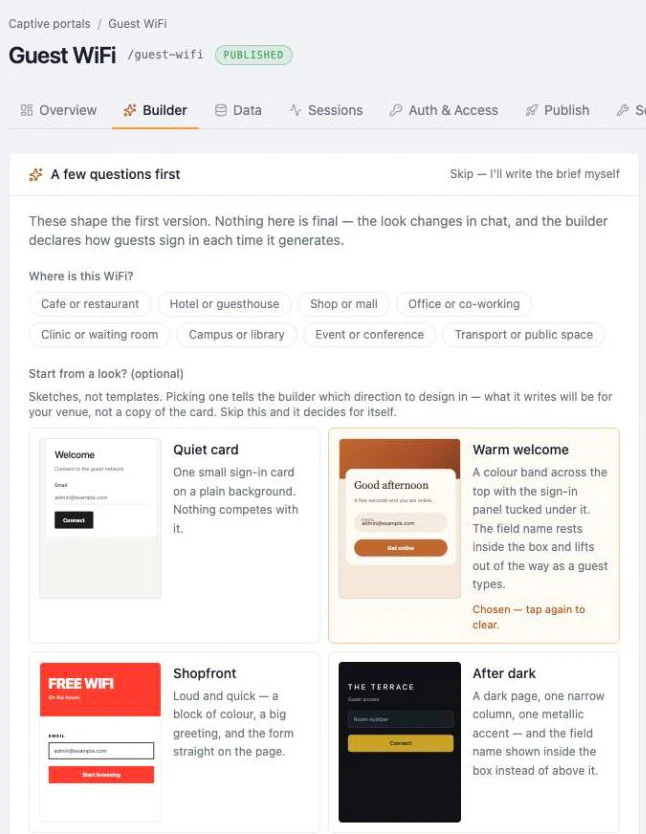
Describe your venue in a sentence and the WiseOne AI builder designs the whole guest journey: the sign-in page, any extra steps and the welcome page guests land on. Refine it by chatting, preview it on a phone, and publish when it is right.
Designed by AI, from a brief
Pick the venue type, mood, language and a starting look, or just describe the place. The builder writes a complete, branded portal to match.
Edit by chat
Ask for changes in plain words: “make the button gold”, “add our spa offer”. Every change is a numbered version you can preview on a phone and roll back.
Single or multi-step journeys
A one-tap page for a quick coffee, or several steps for hotels and parks: welcome, sign in, a sponsored message, then a welcome page.
Advertising built in
Promote offers on the sign-in page, show a sponsored step before connecting, and feature your own deals on the welcome page.
Your languages, your address
Eight languages, Hindi, Bengali and Arabic among them, served from your own domain such as wifi.yourbrand.com.
Safe by construction
Every page is checked before it goes live, and the platform places the sign-in control, so a design can never break login. Publish, or take it offline, in one click.
Portal examples
A portal for every kind of venue
One builder covers very different venues. Here are four of them: a multi-step hotel journey with room sign-in, a one-tap restaurant page, a theme park with social sign-in and a sponsor, and an office where members use their work accounts.
Hotel Veloria
Hotel · HSIAMulti-step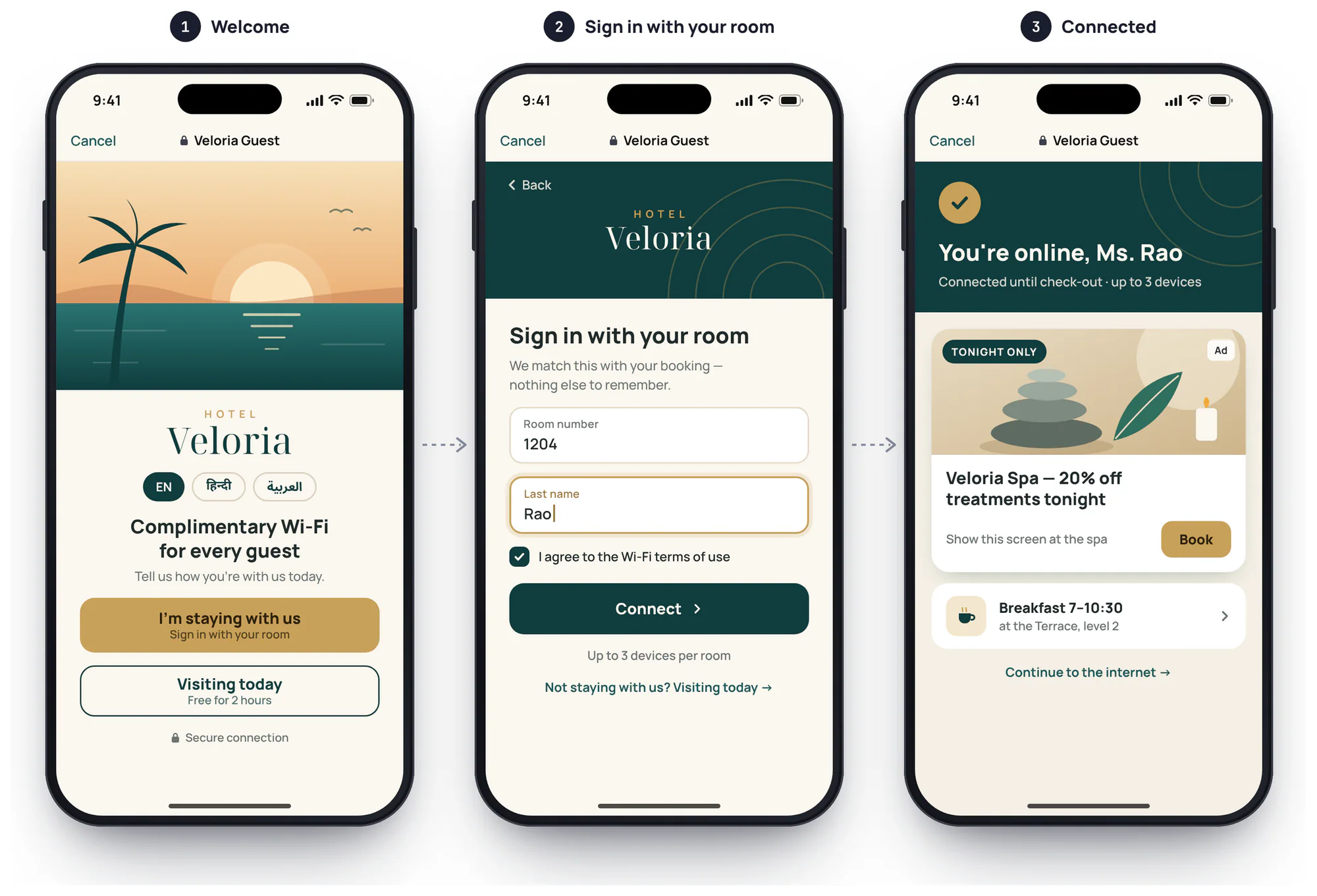
- Journey
- Welcome → room number and surname → connected
- Sign-in
- Room number and surname, matched with the booking; access ends at check-out
- Advertising
- Spa offer and breakfast times on the welcome page
Saffron Table
RestaurantSingle step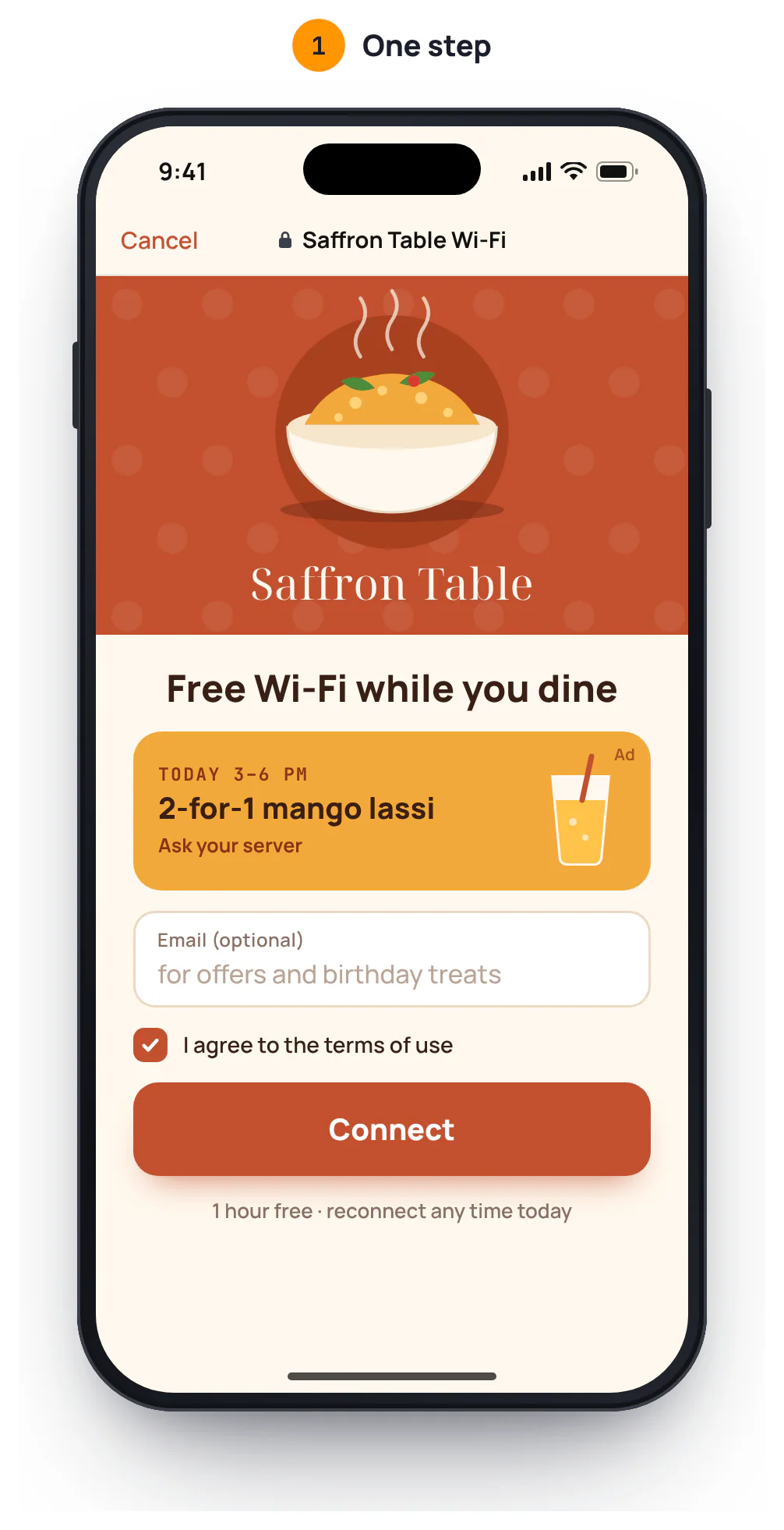
- Sign-in
- One tap, with an optional email for offers
- Advertising
- Today’s special right on the sign-in page
Meridian Works
Office · co-workingSingle step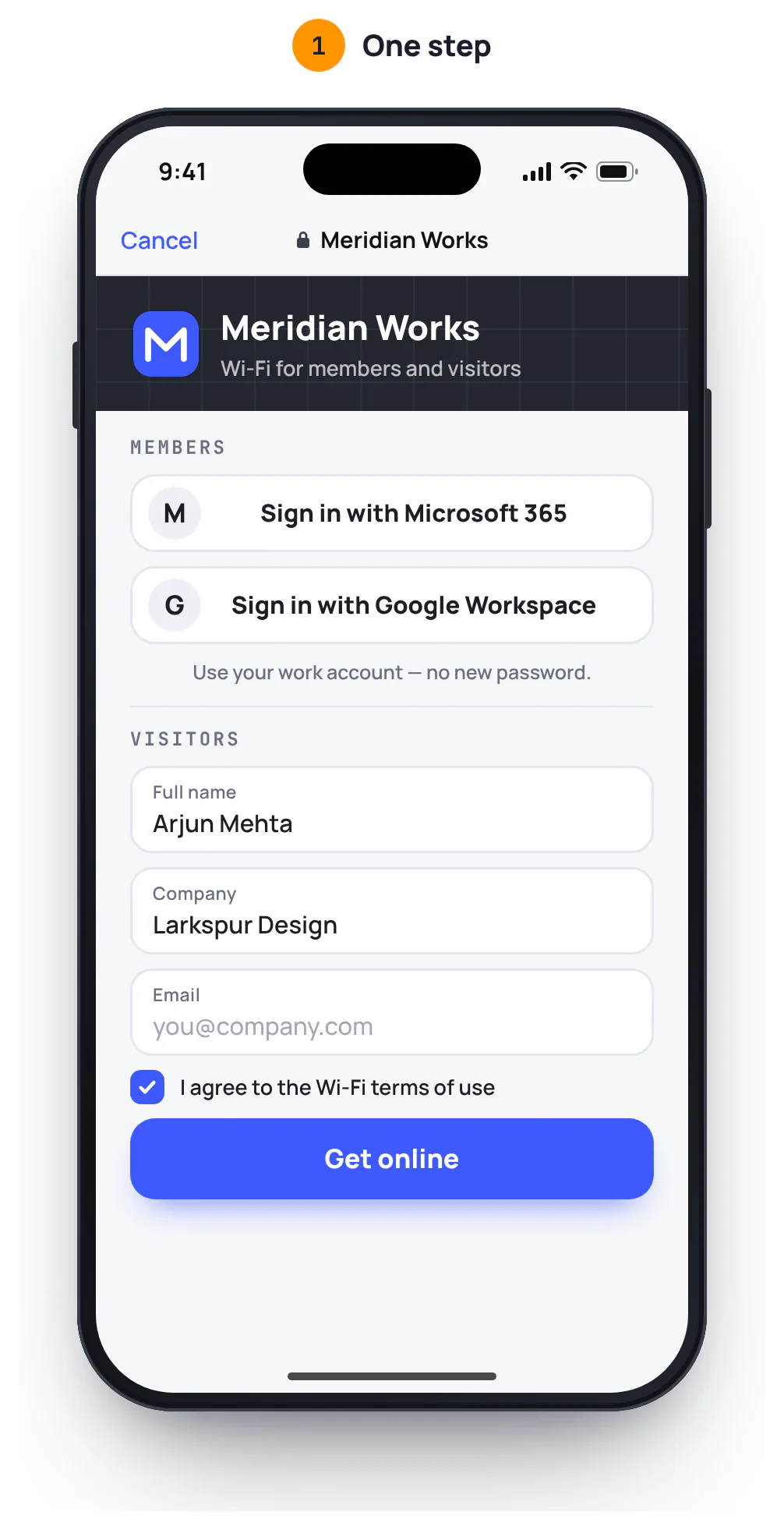
- Sign-in
- Microsoft 365 or Google Workspace for members; a short form for visitors
- Advertising
- None: just fast, secure access
Splashwood Park
Theme parkMulti-step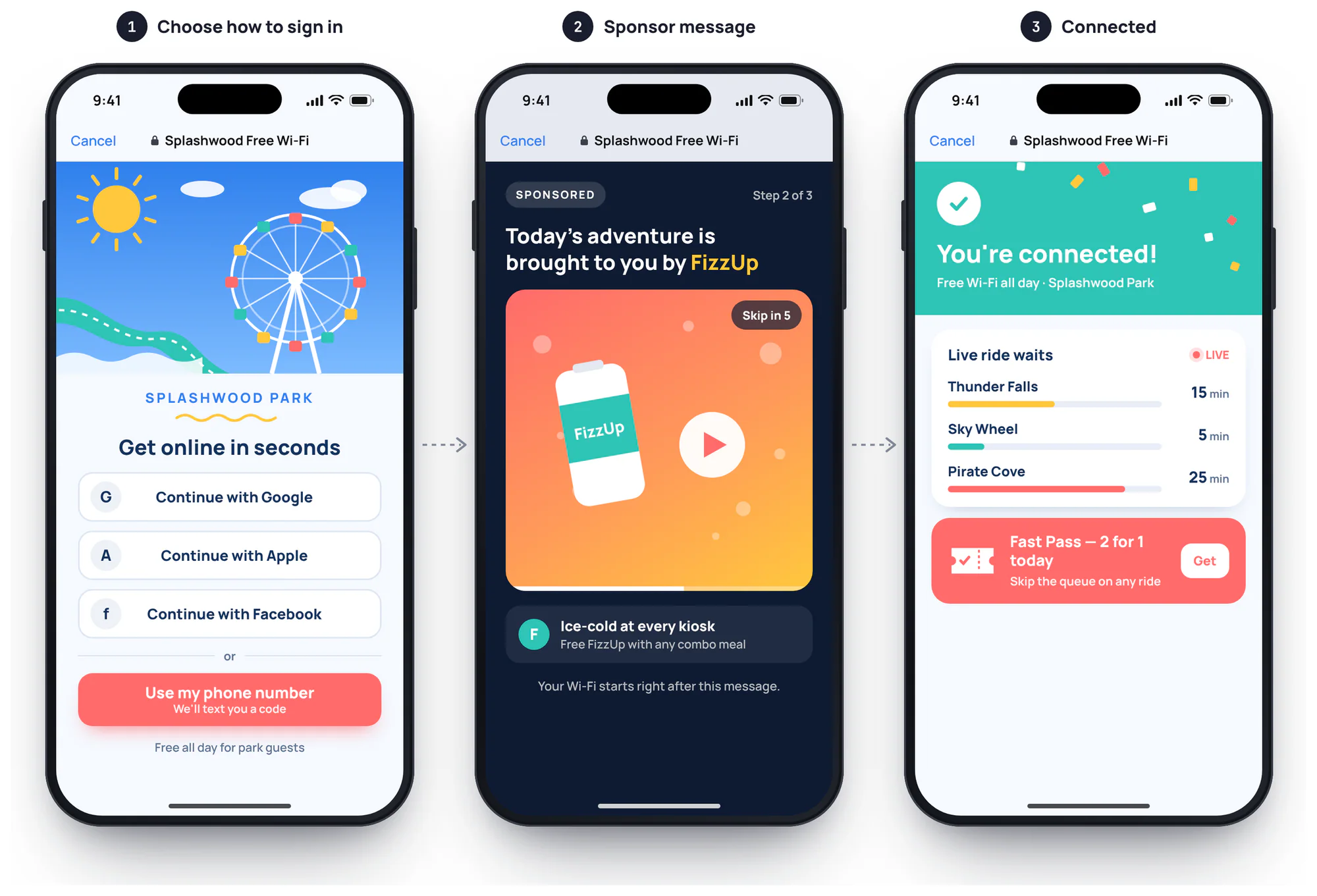
- Journey
- Sign in → sponsored video → connected
- Sign-in
- Google, Apple, Facebook or an SMS code
- Advertising
- A sponsor’s video before connecting, then a Fast Pass offer
Example designs. Venue and sponsor names are fictional.
Sign-in methods
The right way in for every guest
Offer one method or several on the same portal. Guests sign in with accounts they already have, and you decide what they share.
Quick ways in
One tap
Accept your terms and connect. WiseOne records which version of the terms each guest accepted.
Registration form
Name, email, phone, company and your own questions, each required or optional.
SMS one-time code
Guests verify their mobile number with a code. Numbers are masked in every list.
Room number and surname
Hotel guests are matched against their booking, and their access ends at check-out.
Access codes
Visitors sign in with a code from reception or a printed voucher, valid for as long as you set.
With an account they already have
Google, Apple, Facebook
Continue with the account that is already on the phone.
LinkedIn, X, GitHub
Social sign-in for events, co-working spaces and tech venues.
Microsoft 365 / Entra ID
Staff and members sign in with their work account.
Google Workspace
Work and school accounts for offices and campuses.
Okta
Enterprise identity for corporate guests and staff.
Several methods, one portal
Offer a choice of methods, with a deliberate rule whenever a quicker method sits beside a stronger one. If a guest is refused, the page says why.
Consent and quick return
Change your terms and returning guests accept the new version; while their access is valid, they reconnect without signing in.
HSIA and hotspots
Works with the Wi-Fi you already have
WiseOne provides the captive portal and cloud RADIUS for high-speed internet access (HSIA) on the equipment you already run: wireless LAN controllers, cloud-managed access points, or a gateway in front of them. Nothing at the venue needs replacing.
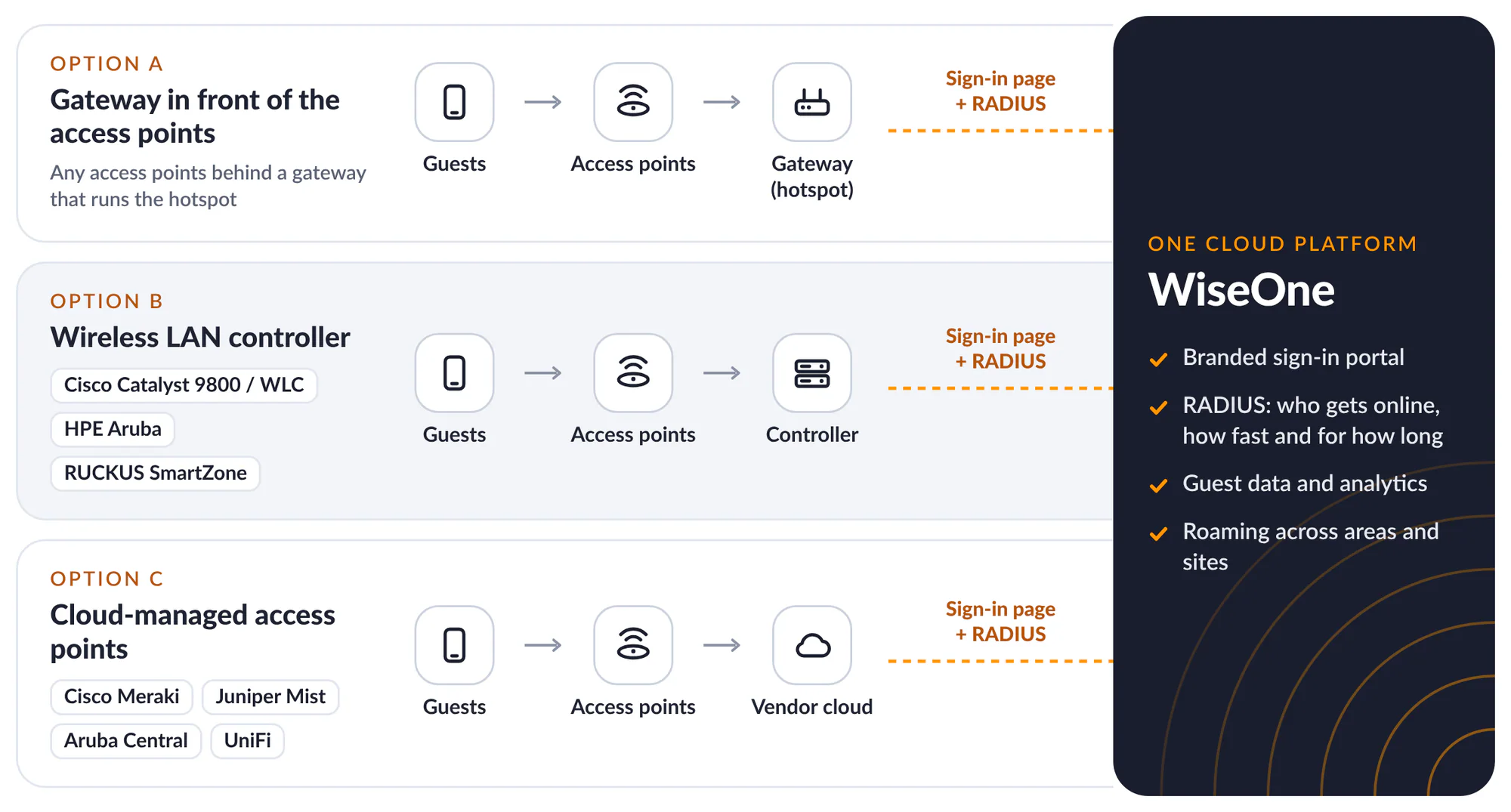
How guests get online
Joins your Wi-Fi
On any access point, from any of the vendors below.
Sees your portal
The phone opens your branded WiseOne sign-in page.
Signs in
WiseOne RADIUS decides who gets online, how fast and for how long.
You see it all
Sessions, analytics and roaming in one console.
Captive portal and RADIUS support
Catalyst 9800 and AireOS wireless LAN controllers
Controller
MR access points and MX security appliances
Cloud-managedMist cloud-managed access points
Cloud-managed
SmartZone, Unleashed and RUCKUS One
Controller and cloud
Aruba Central, Instant and Mobility Controllers
Cloud and controllerFortiGate with FortiAP access points
Security gatewayUniFi gateways and access points
Cloud-managed
cnMaestro-managed access points
Cloud-managedRouterOS gateways, fully managed, with HA and multi-WAN
GatewayAnd any controller or gateway that supports an external captive portal with RADIUS.
Cloud RADIUS
A dedicated RADIUS service decides every sign-in, with a separate secret for each site and protection against forged replies (Blast-RADIUS).
Speed and time per guest
Access length, idle timeout, upload and download speed, and how many sign-ins a device gets per day, week or month.
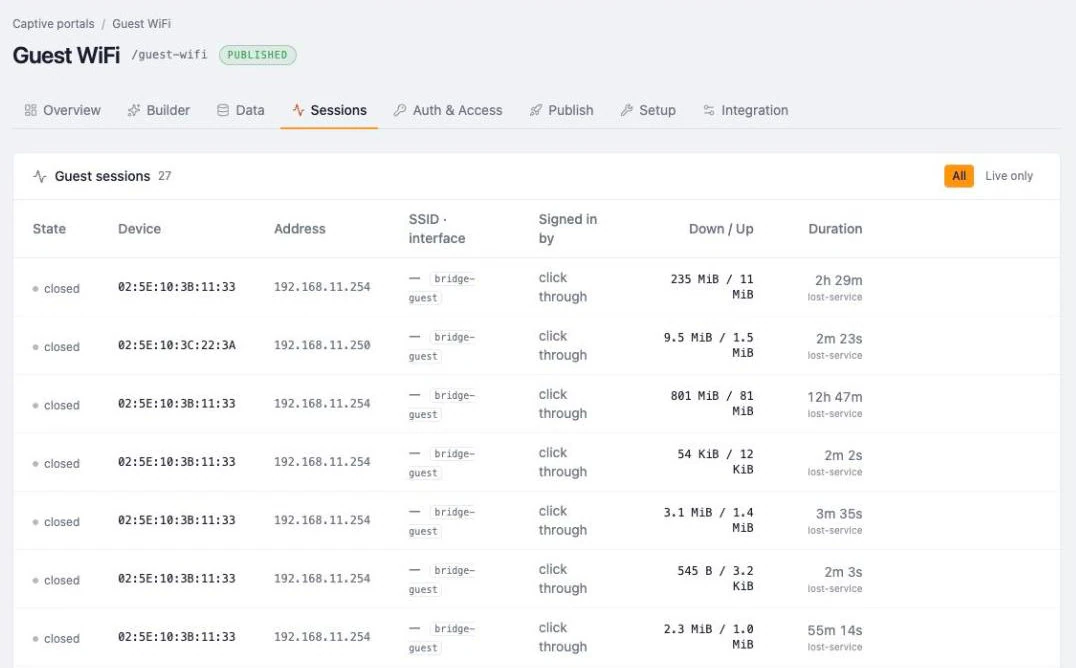
Guest sessions
Every guest session with device, address, network, sign-in method, data used and duration.
Disconnect a guest
End a guest’s access everywhere they are connected, in one click.
Automatic walled garden
Before signing in, guests can reach the sign-in page and nothing else.
15 readiness checks
Each with the evidence behind it, giving one clear verdict per access point before a single guest connects.
Hotspots set up for you
On gateways WiseOne manages, it stages the guest network, DHCP, NAT and hotspot, previews them, applies them safely and removes them cleanly.
Verified on the device
WiseOne reads the gateway back and confirms that every hotspot setting is really there.
Roaming
Sign in once. Stay online everywhere.
Put guest networks into a roaming group and guests move between them, from the lobby to the pool or from one building to the next, without seeing the sign-in page again.

Roaming groups
Group any guest networks. A guest signed in on one is recognised on all the others.
Across floors, buildings and sites
Groups can span floors, buildings and sister properties in the same account.
Each area keeps its rules
A guest who walks into a stricter area still meets that area’s sign-in, terms and limits.
Changes in seconds
Take a network out of a group and its gateways are asked to re-check straight away.
HTTPS sign-in
A padlock on every sign-in page
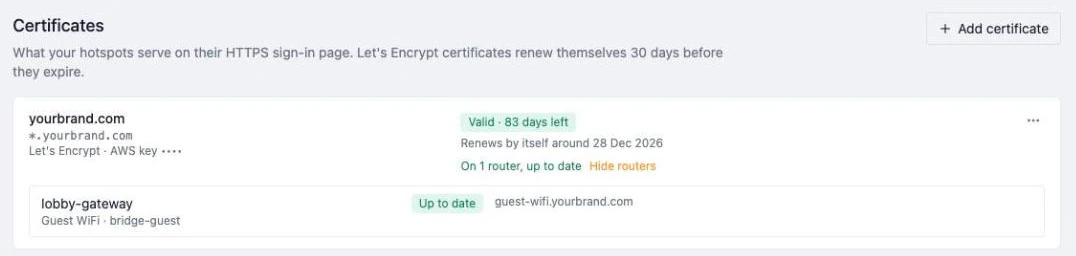
Guests sign in over HTTPS, so their phones show a padlock instead of a warning. WiseOne issues the certificate, installs it, renews it before it expires and switches the old unencrypted sign-in off, without signing anyone out.
 Amazon Route 53
Free certificates, automatically
Let’s Encrypt certificates for your own domain, validated through Amazon Route 53 and renewed 30 days before they expire. Or upload your own.
HTTPS sign-in, plain HTTP off
Turn HTTPS on per hotspot. Once it is confirmed working, the unencrypted sign-in is removed automatically, and turning HTTPS off reverses it safely.
Certificate autopilot
Every 15 minutes WiseOne checks that each site serves the current certificate. Renewals roll out in waves, and any failure pauses the rollout while the old certificate keeps serving.
Alerts in the product
Banners, a sidebar badge and a status per site warn you about a paused rollout or a certificate close to expiry.
Guest analytics and data
Know your guests, and protect their data
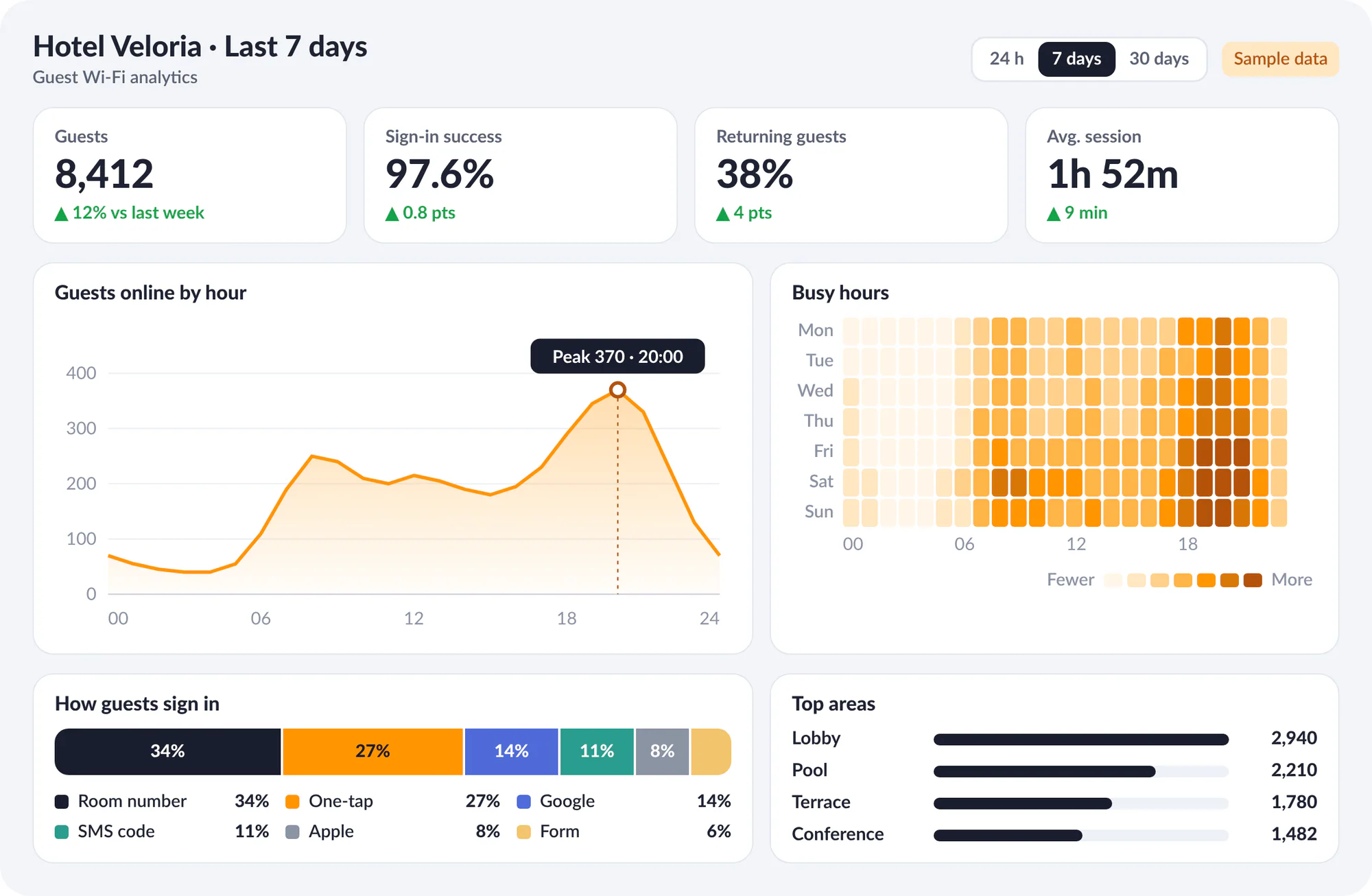
Dashboards for the whole group, each venue and each access point show who comes, how they sign in, how long they stay and when you are busiest. Guest records are one click from a spreadsheet, and privacy controls are built in.
Analytics at every level
Group, venue and access point: guests online, sign-ins, returning guests, data used and session length, with trends.
Busy hours
A day-by-hour board shows when each venue is busiest, so you can staff and plan around it.
How guests sign in
The mix of sign-in methods, and the reasons sign-ins were refused.
Guest records and export
Every sign-in answer in one table, exported to CSV with spreadsheet formulas neutralised.
Privacy masking by role
Only admins see guest details in full. Everyone else sees masked values, downloads included.
Retention you control
Keep guest records from 1 day to 10 years, with a preview of what will be deleted.
Find a guest’s records
Search by phone number to answer data requests quickly.
Provider health
SMS and lookup providers are tracked from real delivery results, with an attention list for anything failing.
Get started
Let’s put WiseOne on your network.
We’ll build a pilot portal for one of your venues in your brand, connect it to the Wi-Fi you already have, and walk your team through the console.